Leroi.
frameSeek — From Film to Archive
Find a photograph by its tags, its subject or another image. Bring negatives into the same archive, from the first scan to the final developed frame.
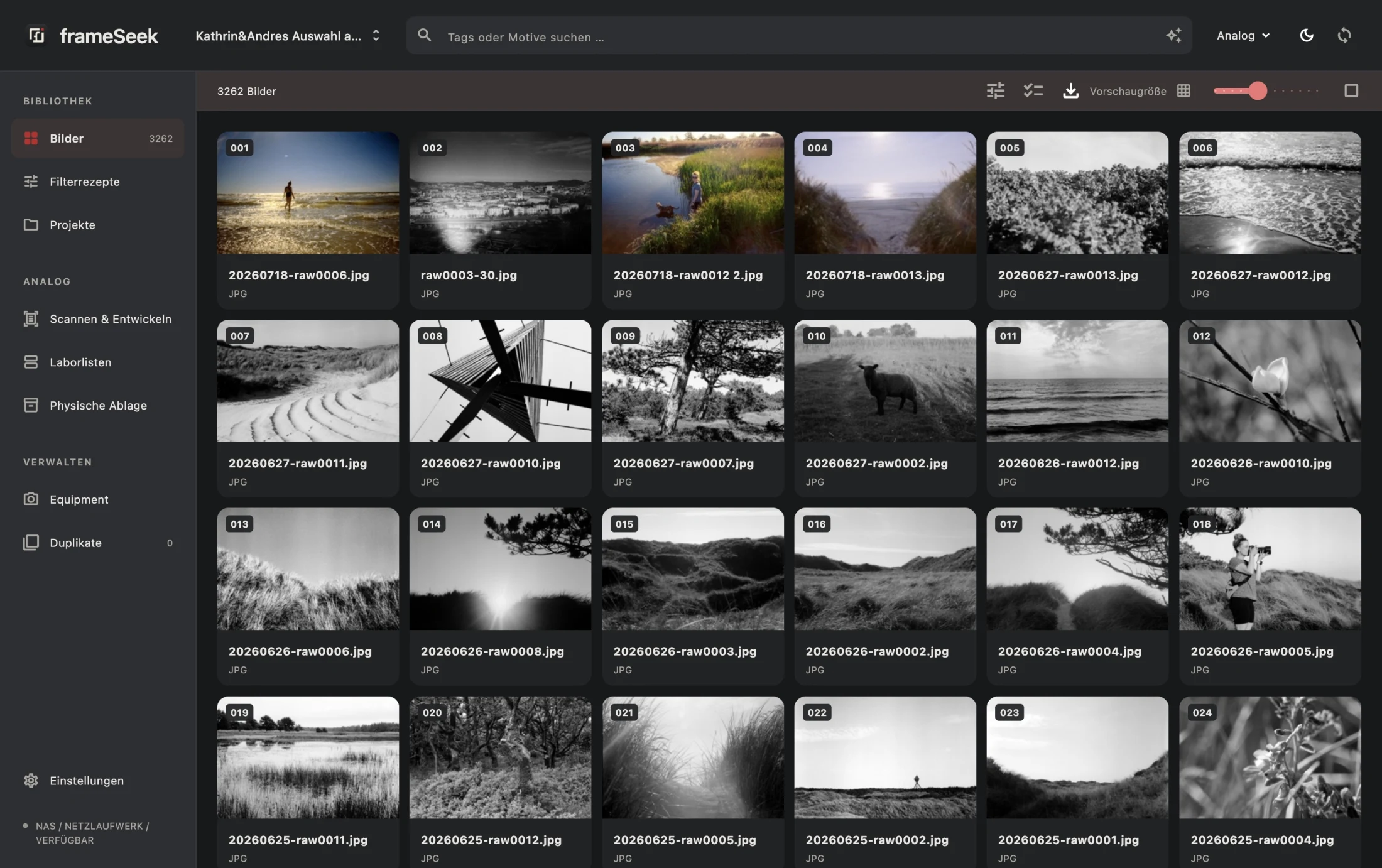
A quieter interface for a growing photographic archive. The redesigned frameSeek pairs warm neutrals, charcoal surfaces and a single red accent with light and dark appearances. Adjustable thumbnails and contextual tools keep the photographs in focus, on a laptop as well as a large display.
Local folders, external disks, Dropbox folders and mounted NAS shares become one searchable catalogue. Tags lead the results, followed by visual matches calculated on the Mac. Saved recipes combine required and excluded tags with semantic search. Cached previews remain visible when a drive is offline, with the original’s storage location clearly identified.
The film workspace now carries a whole roll through scanning and development. It connects to a CanoScan 8800F shared by a Raspberry Pi, detects individual frames and keeps the checked crop through the high-resolution scan. Development is a separate, required step. Confirmed adjustments become suggestions for visually similar future scans; the final images are saved as JPEGs, in a dedicated folder for each film.
The catalogue connects digital files to physical negative sheets, lab lists, contact sheets and equipment. Batch exports control image size and compression. Duplicate review can keep one original and replace the others with Finder aliases on the same volume. An optional MCP server lets Claude work with the catalogue while frameSeek is open; access and editing permissions are controlled in the app.
The film workspace / One step at a time
A roll in.
An archive out.
A dedicated full-screen workflow, from the negative holder to the finished photograph. Pause a session and pick it up later.
Film
Choose the destination and record photographer, camera, film stock, ISO and negative sheet.
Overview
Place the film in its holder. Create a developed overview of the strip.
Check frames
Review detected frames, correct crops and select the photographs to scan.
Scan
Capture the selected frames at high resolution through the networked scanner.
Develop
Refine tone and colour. Start from learned settings for a similar frame, then make it your own.
Finish
Save the finished JPEGs, complete the film and keep its place in the physical archive.
CanoScan 8800F, Raspberry Pi and frameSeek. The Mac app includes its own SANE network client, so it needs no separate scanner installation.
A new visual identity
Less interface.
More photograph.
An open photographic frame, a quiet wordmark and one red accent. The same identity carries through the app icon, the start screen and both appearances.
Built for the desk and the darkroom.Local search and development matching. Original files stay on your own storage. Claude access is optional and only available while enabled in the running app.